TP-Link
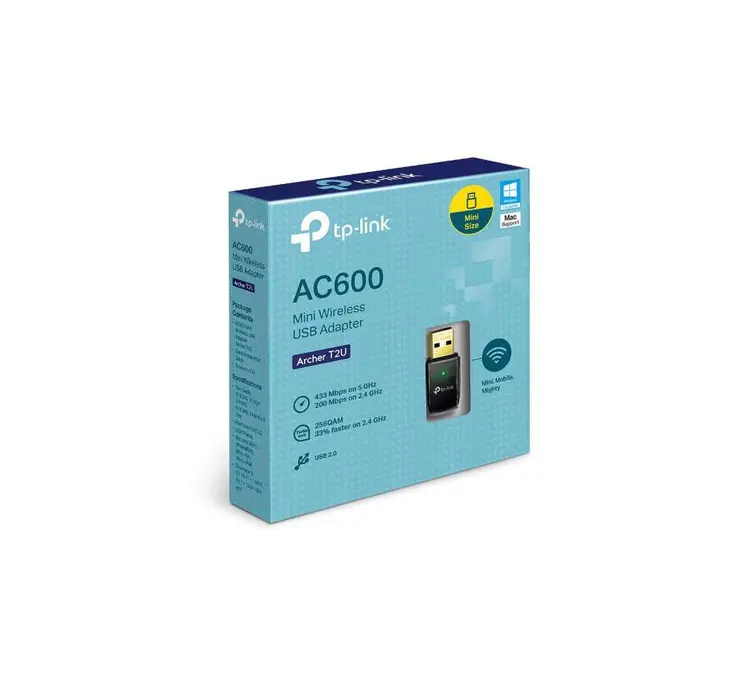
TP-Link AC600 Wireless Dual Band USB Adapter - TL-Archer T2U
KES 2,200
In StockKey Features
- 802.11ac Dual Band WiFi – Up to 433 Mbps on 5 GHz + 150 Mbps (upgraded to 200 Mbps with 256-QAM) on 2.4 GHz → Total AC600 class speed
- True Dual-Band Operation – Choose 5 GHz for speed & less interference or 2.4 GHz for longer range and better wall penetration
- Ultra-Compact Mini Design – Only 41 × 19.5 × 8.7 mm – smaller than most USB flash drives, perfect for laptops and travel
- High-Speed USB 2.0 Interface – Plug-and-play on virtually any computer (works even better if plugged into a USB 3.0 port)
- 256-QAM Support – Boosts 2.4 GHz performance by 33% compared to standard 802.11n adapters (150 Mbps → 200 Mbps)
- WPS One-Button Security – Instant secure connection with any WPS-enabled router – no need to type long passwords.
- Strong Security Protocols – Supports 64/128-bit WEP, WPA/WPA2, WPA-PSK/WPA2-PSK (AES/TKIP) encryption
- Wide OS Compatibility– Windows 11/10/8.1/8/7/XP (32/64-bit)
– Mac OS X 10.9–10.15
-Linux (Kernel 2.6.24 ~ 5.9) with driver
- Backward Compatibility- Fully compatible with older 802.11a/b/g/n networks10SoftAP ModeTurn your PC into a WiFi hotspot to share internet with phones/tablets
- Advanced Heat Dissipation -Premium internal design prevents overheating during long streaming/gaming sessions
- LED Status Indicator – Easy visual confirmation of power and wireless activity
Product Description
TP-Link Archer T2U AC600 Wireless Dual Band USB Adapter
The TP-Link AC600 Wireless Dual Band USB Adapter (Archer T2U) is a cheap way to get your WiFi up to speed. You can find it at Phonex Tech. It's a small gadget that gives you the latest WiFi without costing a lot.
The TP-Link Archer T2U lets you switch between two WiFi bands. It can hit speeds up to 433Mbps on the 5GHz band and 200Mbps on the 2.4GHz band. That means you can stream videos, play games, and do everyday stuff without lag.
Why go with a USB WiFi Adapter Like the TP-Link Archer T2U?
Lots of old computers and laptops have old WiFi that can't go faster than 150Mbps. That can cause problems when you're watching Netflix or playing games. A USB WiFi adapter fixes this by plugging into a USB port and giving you faster, more reliable WiFi.
The TP-Link Archer T2U AC600 is a good pick because it works well, is easy to carry around, and doesn't cost a fortune. Some adapters are big and have antennas sticking out, but the T2U is small and simple. It also works with older WiFi routers, so you don't have to worry about it not working.
You can buy the TP-Link Archer T2U from us at a good price. We ship fast and have good customer service. If you're searching for a good, cheap USB WiFi adapter, this one is always near the top of the list.
What's Cool About the TP-Link Archer T2U AC600 Dual Band USB Adapter
Here are the main reasons why the Archer T2U is a good choice:
- Two WiFi Bands: You can pick either the 2.4GHz band (up to 200Mbps) or the 5GHz band (up to 433Mbps). The 2.4GHz band works better through walls, and the 5GHz band is faster and has fewer problems with interference.
- Newer WiFi: It uses a newer type of WiFi called 802.11ac, which is way faster than older WiFi. It can hit speeds up to 600Mbps.
- Small: It's tiny, about the size of a USB drive, so it's easy to take with you.
- Easy Setup: You can connect with one button if your router supports it. It works with Windows, Mac OS, and even some versions of Linux.
- Safe and Secure: It keeps your WiFi safe from hackers with different types of security.
- Works with USB: It plugs into any USB port.
Compared to other models like the smaller Archer T2U Nano or the Archer T2U Plus (which has a bigger antenna), the standard T2U is a good middle ground. It doesn't need an external antenna for most homes but is still strong enough for everyday use.
How to Set It Up
When you get the TP-Link Archer T2U from Phonex Tech, the box has the adapter, a CD with drivers, a quick setup guide, and warranty info.
1. Plug It In: Put the Archer T2U into a USB port on your computer.
2. Install the Drivers: If you have Windows 10 or 11, it might just work automatically. If not, use the CD or download the drivers from TP-Link's website.
3. Connect to WiFi: Find your WiFi network in your computer's settings and type in the password.
How Well Does It Work?
The Archer T2U does pretty well. On the 5GHz band, you can get speeds of 300-400Mbps when you're close to the router. That's plenty fast for streaming videos or downloading games. The 2.4GHz band is good for browsing the web and checking email.
Why Dual Band Matters
Dual band is a big deal. The 2.4GHz band is often crowded, which slows things down. The T2U lets you switch to the 5GHz band, which is cleaner and faster.
- Streaming: Watch Netflix, YouTube, or Disney+ without buffering.
- Gaming: Get lower ping and less lag in games.
- Work: Have smooth video meetings and quick file transfers.
If your router has dual band, the Archer T2U makes the most of it.
What It Works With
The TP-Link Archer T2U works with:
- Windows: XP to 11
- Mac OS: Up to 10.14
- Linux: Many versions.
It's good for old computers that need WiFi or laptops with broken WiFi. We at Phonex can help if you have questions about whether it will work with your computer.
## Problems and Fixes
Sometimes there are driver problems on older Windows—download the latest drivers from TP-Link's website to fix it. If the signal is weak, move it away from metal or use a USB extension cable (Phonex Tech sells these).
The TP-Link AC600 Wireless Dual Band USB Adapter (Archer T2U) is a great choice if you need fast, reliable WiFi without spending a lot of money. It's easy to set up and small.